Multi Room Audio Player5.0
Publisher Description
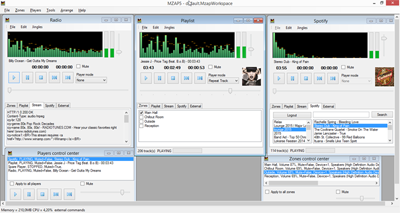
Multi Room Audio Player is far more than just another media player. With this solution, it is possible to utilize your available hardware in such a way that you can provide audio to multiple areas of a place such as a nightclub from a single, centralized solution. Each channel of each available soundcard can be used to play a separate audio stream, each one in a different location. This means that you know longer have to have separate machines each with their own media players. This saves time, money and makes the entire process far more efficient. Multi Room Audio Player is ideal for all kinds of public venues with multiple areas which need to have different music, such as shopping centers or nightclubs. The software also provides some welcome extra features, including a 12-band equalizer for each audio stream, support for a wide variety of formats, and playlist organizers. Multi Room Audio Player is mostly of use to those who are in charge of music in public venues, though there is also a cheaper license available for those who need it for personal use.
About Multi Room Audio Player
This Audio File Players program is available in English, Russian. It was last updated on 29 October, 2026. Multi Room Audio Player is compatible with the following operating systems: Windows.
The company that develops Multi Room Audio Player is PistonSoft. The latest version released by its developer is 5.0. This version was rated by 3 users of our site and has an average rating of 5.0.
The download we have available for Multi Room Audio Player has a file size of 9.4 MB. Just click the green Download button above to start the downloading process. The program is listed on our website since 2015-07-28 and was downloaded 467 times. We have already checked if the download link is safe, however for your own protection we recommend that you scan the downloaded software with your antivirus. Your antivirus may detect the Multi Room Audio Player as malware if the download link is broken.
How to install Multi Room Audio Player on your Windows device:
- Click on the Download button on our website. This will start the download from the website of the developer.
- Once the Multi Room Audio Player is downloaded click on it to start the setup process (assuming you are on a desktop computer).
- When the installation is finished you should be able to see and run the program.
Program Details
System requirements
Download information
Pricing
Version History
version 5.0
posted on 2015-07-28
Remote Control over network has been added.
